Within Prompt Loops
How people steer AI images one prompt at a time
Image prompting shows iteration clearly because users can adjust lighting, composition, style, and subject details after each result.
On this page
- From broad image ideas to specific visual briefs
- What users change after seeing the first image
- Why visual iteration teaches users the system
Page outline Jump by section
Introduction
Image-generation tools make prompt iteration unusually visible. A user can describe an idea, receive an image within seconds, spot what feels wrong or incomplete, and immediately issue a revised instruction. Rather than creating a picture in one step, many people reach their desired result through a sequence of increasingly specific prompts. This process has become one of the clearest examples of prompt iteration as a creative workflow in artificial intelligence.
 Research, industry guidance, and user studies consistently show that successful image generation often depends on repeated refinement rather than a perfect first prompt. Users gradually specify subjects, styles, composition, lighting, colours, camera angles, and fine details while responding to what the system actually produced. The image itself becomes feedback that shapes the next instruction.[Adobe Help Center+2OpenAI]helpx.adobe.comwriting effective text promptsAdobe Help CenterWrite effective text prompts for Adobe Firefly10 Apr 2026 — Learn to create descriptive, specific, and original text pro…
From broad image ideas to specific visual briefs
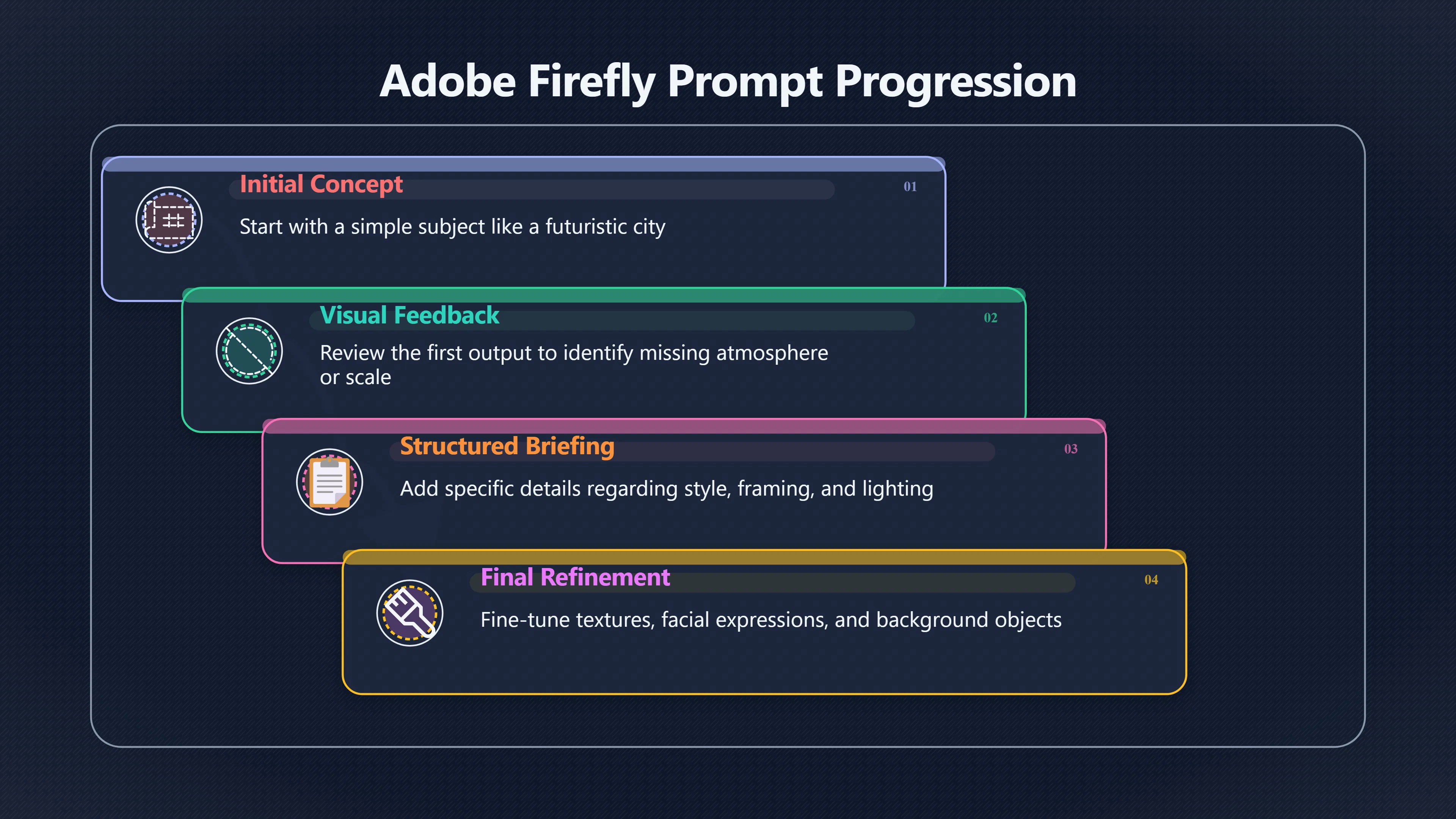
Most image-generation sessions begin with a relatively simple idea: a futuristic city, a fantasy landscape, a product photograph, or a character concept. Early prompts often focus on the central subject rather than every visual detail.
A first prompt might be:[medium.com]medium.comPrompt Engineering Course by OpenAIIn this first article, we will review some of the OpenAI guidelines for prompting that allow you to ma…
A Victorian greenhouse on Mars.
The resulting image gives the user something concrete to react to. After seeing it, the user may realise that the greenhouse is too small, the architecture is wrong, or the scene lacks atmosphere. The next prompt becomes more detailed:
A vast Victorian glass greenhouse on Mars at sunset, viewed from a low angle, with red dust storms in the background.
As iteration continues, the prompt gradually resembles a creative brief rather than a simple description. Industry guidance from Adobe, OpenAI, and other image-generation providers encourages users to move from general concepts toward structured instructions covering subject matter, style, framing, lighting, mood, and visual details.[Adobe+3Adobe Help Center+3Adobe]helpx.adobe.comwriting effective text promptsAdobe Help CenterWrite effective text prompts for Adobe Firefly10 Apr 2026 — Learn to create descriptive, specific, and original text pro…
A common progression looks like this:
- Subject – what the image depicts.
- Style – photographic, illustrated, cinematic, painterly, and so on.
- Composition – close-up, wide shot, overhead view, centred framing.
- Lighting and colour – golden hour, studio lighting, monochrome palette.
- Detail refinements – clothing, textures, facial expression, background objects.
Instead of imagining all these requirements in advance, users frequently discover them while reviewing generated outputs. This is one reason image prompting often feels more like directing a creative collaborator than issuing a command.[Fritz ai+2transmedia.co.uk]fritz.aihow to prompt in adobe firefly the ultimate guideStart with a Clear Subject · 2. Define the Art Style · 3. Add Colors & Lighting · 4. Use Camera Angles & Composition · 5. Add Action & Mo…
What users change after seeing the first image
The first generated image often succeeds in some areas and fails in others. Prompt refinement usually targets a small number of visible problems rather than rewriting everything at once.
Adjusting composition and framing
One of the most common revisions concerns composition. Users may like the subject but dislike how it is arranged within the frame.
Typical follow-up instructions include:
- Move the character closer to the camera.
- Make the scene wider.
- Place the subject on the left side of the image.
- Show the entire building rather than a cropped view.
- Use an aerial perspective.
Because composition is immediately visible, users can evaluate it quickly and issue highly targeted corrections. Adobe’s prompting guidance specifically highlights perspective, framing, and camera positioning as key controllable elements in image generation.[Adobe+2Adobe]adobe.comAI image prompt examplesAI image prompt examples - Adobe FireflyThese prompts use terminology around perspective, materials, lighting setups, and rendering…
Refining lighting and mood
A prompt may produce the correct scene but the wrong emotional tone. Users therefore modify lighting to influence atmosphere.
Common changes include:
- Switching from daylight to sunset.
- Replacing harsh lighting with soft lighting.
- Adding cinematic shadows.
- Introducing fog, rain, or dramatic weather.
- Increasing contrast for a more dramatic look.
Many prompting frameworks explicitly treat lighting as a separate control variable because it strongly affects how viewers interpret the image.[Fritz ai+2Adobe]fritz.aihow to prompt in adobe firefly the ultimate guideStart with a Clear Subject · 2. Define the Art Style · 3. Add Colors & Lighting · 4. Use Camera Angles & Composition · 5. Add Action & Mo…
Steering style and visual identity
Users frequently discover that the generated image matches the subject but not the desired aesthetic.
They may shift between:
- Photorealistic and illustrated styles.
- Watercolour and oil-painting effects.
- Anime and comic-book aesthetics.
- Vintage and contemporary looks.
- Minimalist and highly detailed presentations.
This kind of iteration often happens in multiple rounds because visual styles can affect many image features simultaneously. A style change may solve one problem while creating another, leading to further refinement.[Adobe Help Center+2Adobe Help Center]helpx.adobe.comwriting effective text promptsAdobe Help CenterWrite effective text prompts for Adobe Firefly10 Apr 2026 — Learn to create descriptive, specific, and original text pro…
Correcting subject details
Another common pattern involves progressively refining the subject itself.
For example, a user creating a character concept might successively adjust:
- Hair style.
- Clothing.
- Facial expression.
- Age.
- Accessories.
- Pose.
Each revision narrows the gap between a general concept and a specific imagined result. OpenAI’s image-generation materials describe this process as rapid iteration in which users request variations and make targeted adjustments to composition, appearance, and design direction.[OpenAI]OpenAIimage generationCreating images with ChatGPTApr 10, 2026 — Learn how to create and refine images with ChatGPT using clear prompts, iterate on designs, an…
Why many users change only one thing at a time
Experienced users often avoid rewriting every aspect of a prompt simultaneously. Instead, they isolate variables.
For example:
- Round 1: establish the subject.
- Round 2: adjust composition.
- Round 3: improve lighting.
- Round 4: refine clothing details.
This approach makes it easier to understand which instruction caused which visual change. OpenAI’s image prompting guidance explicitly recommends iterative refinement rather than overloading prompts with many simultaneous modifications because smaller changes are easier to evaluate and debug.[GitHub]github.cominstead of overloading: Long prompts can work well, but debugging is easier when you start with a clean base prompt and refine with small…
The practice resembles experimentation. Users form a hypothesis—”the image would look better with softer lighting”—test it, inspect the result, and decide whether to keep or discard the change.
Over time, users build practical knowledge about how particular models respond to particular kinds of instructions.

Why visual iteration teaches users the system
Image generation creates a rapid feedback loop that helps users learn how AI interprets language.
A user might initially assume that “dramatic” means the same thing to the model that it means to them. After seeing several outputs, they discover that the system consistently associates the word with specific colours, lighting patterns, or compositions. They then adapt their prompts accordingly.
Researchers studying image-generation workflows have found that iterative interaction helps users develop an understanding of model behaviour and achieve outputs that better match their intentions. Systems such as PromptCharm were designed specifically around this idea, using feedback and refinement loops to help users learn how prompts influence generated images. User studies reported improved alignment between generated images and user expectations when iterative refinement support was available.[arXiv]arxiv.orgOpen source on arxiv.org.
The learning process is often practical rather than theoretical. Users do not need to understand neural networks or diffusion models in detail. Instead, they learn relationships such as:
- Certain style terms reliably produce particular aesthetics.
- Specific camera-language terms affect framing.
- Lighting descriptions strongly influence mood.
- Extra detail sometimes improves results and sometimes creates clutter.
Repeated prompting becomes a form of experimentation with the model’s visual vocabulary.[Adobe Help Center+2Meta AI]helpx.adobe.comwriting effective text promptsAdobe Help CenterWrite effective text prompts for Adobe Firefly10 Apr 2026 — Learn to create descriptive, specific, and original text pro…
From prompting to co-creative direction
As users become more experienced, prompt iteration often shifts from correcting mistakes to exploring possibilities.
Instead of asking:
Fix the background.
They may ask:
Show three alternative backgrounds with different moods.
The goal changes from error correction to creative exploration. Multiple candidate images can inspire new ideas that were not part of the original concept. Researchers studying professional creative workflows have observed that image-generation systems are frequently used first for broad idea generation and later for detailed refinement, with different interaction styles becoming useful at different stages of a project.[arXiv]arxiv.orgLACE: Controlled Image Prompting and Iterative Refinement with GenAI for Professional Visual Art CreatorsApril 21, 2025…
This is one reason image generation has become a prominent example of AI-assisted creativity. The prompt is not merely an input. It evolves through repeated interaction, with each generated image informing the next instruction. The final picture often reflects a chain of decisions made across many rounds rather than a single moment of inspiration.[OpenAI+2wired.com]OpenAIimage generationCreating images with ChatGPTApr 10, 2026 — Learn how to create and refine images with ChatGPT using clear prompts, iterate on designs, an…
Amazon book picks
Further Reading
Books and field guides related to How people steer AI images one prompt at a time. Use these as the next step if you want deeper reading beyond the article.
Co-Intelligence
Provides broader context for AI-assisted creative workflows including image generation.
Creative Confidence
Aligns with learning through repeated experimentation and refinement.
Steal Like An Artist
Supports iterative visual idea development and creative experimentation.
The Art of Prompt Engineering with ChatGPT
Many prompt-design principles transfer directly to image generation.
eBay marketplace picks
Marketplace Samples
Example marketplace items related to this page. Use the search link to explore similar finds on eBay.
Endnotes
1.
Source: helpx.adobe.com
Title: writing effective text prompts
Link:https://helpx.adobe.com/firefly/web/generate-images-with-text-to-image/generate-images-using-text-prompts/writing-effective-text-prompts.html
Source snippet
Adobe Help CenterWrite effective text prompts for Adobe Firefly10 Apr 2026 — Learn to create descriptive, specific, and original text pro...
2.
Source: OpenAI
Title: image generation
Link:https://openai.com/academy/image-generation/
Source snippet
Creating images with ChatGPTApr 10, 2026 — Learn how to create and refine images with ChatGPT using clear prompts, iterate on designs, an...
3.
Source: arxiv.org
Link:https://arxiv.org/abs/2403.04014
4.
Source: adobe.com
Title: AI image prompt examples
Link:https://www.adobe.com/products/firefly/ai-generated-examples/image-prompts.html
Source snippet
AI image prompt examples - Adobe FireflyThese prompts use terminology around perspective, materials, lighting setups, and rendering...
5.
Source: ai.meta.com
Title: prompts for ai images 10 examples and tips for better results
Link:https://ai.meta.com/learn/ai-creativity/prompts-for-ai-images-10-examples-and-tips-for-better-results/
Source snippet
for AI images: 10 examples and tips for better results10 Mar 2026 — Learn how to write effective prompts for AI images to create stunning...
6.
Source: adobe.com
Title: generate realistic photos
Link:https://www.adobe.com/learn/firefly/web/generate-realistic-photos
Source snippet
with a prompt formula in Firefly1 May 2026 — Start with reference images and build out a prompt formula that controls pose, framing, ligh...
Published: May 2026
7.
Source: fritz.ai
Title: how to prompt in adobe firefly the ultimate guide
Link:https://fritz.ai/how-to-prompt-in-adobe-firefly-the-ultimate-guide/
Source snippet
Start with a Clear Subject · 2. Define the Art Style · 3. Add Colors & Lighting · 4. Use Camera Angles & Composition · 5. Add Action & Mo...
8.
Source: transmedia.co.uk
Link:https://www.transmedia.co.uk/article/firefly-prompt-structures-that-work-real-examples-used-by-creative-professionals
Source snippet
Adobe Firefly Prompt Structures for Creative Teams10 Nov 2025 — Composition and camera: framing, angle, depth and negative space...
9.
Source: adobe.com
Title: AI Art Prompts You Need to Try
Link:https://www.adobe.com/uk/products/firefly/discover/ai-art-prompts.html
Source snippet
Adobe FireflyAI art prompts can help you create compositions for product visualisations, architectural renders, concept art and much more...
10.
Source: helpx.adobe.com
Title: Help Center Set styles for image generation
Link:https://helpx.adobe.com/firefly/mobile/generate-images-with-text-to-image/customize-generated-images/set-styles-for-image-generation.html
Source snippet
Adobe Help CenterSet styles for image generation - Firefly10 Dec 2025 — On the home screen, tap Text to image.; Enter a text prompt in t...
11.
Source: developers.openai.com
Title: image gen models prompting guide
Link:https://developers.openai.com/cookbook/examples/multimodal/image-gen-models-prompting-guide
Source snippet
Image Generation Models Prompting GuideApr 21, 2026 — Introduction. OpenAI's gpt-image generation models are designed for [production]({{ 'retrieval-failures/' | relative_url }})-qual...
12.
Source: github.com
Link:https://github.com/openai/openai-cookbook/blob/main/examples/multimodal/image-gen-models-prompting-guide.ipynb
Source snippet
instead of overloading: Long prompts can work well, but debugging is easier when you start with a clean base prompt and refine with small...
13.
Source: arxiv.org
Link:https://arxiv.org/abs/2504.15189
Source snippet
LACE: Controlled Image Prompting and Iterative Refinement with GenAI for Professional Visual Art CreatorsApril 21, 2025...
Published: April 21, 2025
14.
Source: wired.com
Link:https://www.wired.com/story/dall-e-3-open-ai-chat-gpt
Source snippet
The quote 'Find the universe within you' is etched in bold letters across the horizon." Furthermore, OpenAI announced measures to protect...
15.
Source: arxiv.org
Link:https://arxiv.org/abs/2310.08541
16.
Source: arxiv.org
Link:https://arxiv.org/html/2509.12446v1
Source snippet
Multi-Agent Based Text-to-Image Prompt Optimization15 Sept 2025 — However, to generate high-quality images, users must still craft detail...
17.
Source: arxiv.org
Link:https://arxiv.org/html/2509.13760v1
Source snippet
Iterative Prompt Refinement for Safer Text-to-Image...Sep 17, 2025 — This process repeats until a satisfactory image is obtained or a pr...
18.
Source: help.openai.com
Title: 10032626 prompt engineering best practices for chatgpt
Link:https://help.openai.com/en/articles/10032626-prompt-engineering-best-practices-for-chatgpt
Source snippet
engineering best practices for ChatGPTThis guide provides resources to help ChatGPT users craft effective prompts for high-quality respon...
19.
Source: community.openai.com
Title: how are reference images used internally do i need to mention them in the prompt
Link:https://community.openai.com/t/how-are-reference-images-used-internally-do-i-need-to-mention-them-in-the-prompt/1240748
Source snippet
are reference images used internally, do I need to...Apr 24, 2025 — i have a prompt that uses two images with the edit endpoint and in i...
20.
Source: developers.openai.com
Title: prompt guidance
Link:https://developers.openai.com/api/docs/guides/prompt-guidance
Source snippet
guidance | OpenAI APIThis guide focuses on prompt changes that follow from those behavior changes. The patterns here are starting points...
21.
Source: OpenAI
Title: new chatgpt images is here
Link:https://openai.com/index/new-chatgpt-images-is-here/
Source snippet
comThe new ChatGPT Images is here16 Dec 2025 — “GPT Image 1.5 generates high-fidelity images with strong prompt adherence, preserving com...
22.
Source: community.openai.com
Link:https://community.openai.com/t/ways-to-prompt-consistent-image-generation-for-dall-e-api/354196
Source snippet
to prompt consistent image generation for DALL-E APISep 5, 2023 — Use adjectives, nouns, and references (both other prompts and images) w...
23.
Source: adobe.com
Link:https://www.adobe.com/tw/
Source snippet
Adobe:創意、行銷和文件管理解決方案使用Adobe 軟體,創作精美的作品、提高工作效率,並提供引人入勝的客戶體驗。 檢視所有產品. ADOBE FOR [BUSINESS]({{ 'business-adoption/' | relative_url }}). 從Adobe 開始。Read more...
24.
Source: community.adobe.com
Link:https://community.adobe.com/questions-404/how-to-improve-image-quality-and-realism-in-adobe-firefly-looking-for-tips-best-practices-1477174
Source snippet
to Improve Image Quality and Realism in...19 Nov 2025 — I’ve been spending a lot of time experimenting with Adobe Firefly recently, and...
25.
Source: community.adobe.com
Title: how to improve prompt quality and consistency in adobe firefly 1624086
Link:https://community.adobe.com/questions-404/how-to-improve-prompt-quality-and-consistency-in-adobe-firefly-1624086
Source snippet
to improve prompt quality and consistency in Adobe...19 May 2026 — Has anyone noticed longer generation times or inconsistent image qual...
Published: May 2026
26.
Source: adobe.design
Link:https://adobe.design/
Source snippet
is the multidisciplinary, global organization behind Adobe experiences...
27.
Source: Wikipedia
Title: Adobe Inc
Link:https://en.wikipedia.org/wiki/Adobe_Inc
Source snippet
Adobe Inc.It offers a wide range of programs from web design tools, photo manipulation, and vector creation to video and audio editing...
28.
Source: docs.pruna.ai
Link:https://docs.pruna.ai/en/stable/docs_pruna_endpoints/image_generation/advanced.html
Source snippet
Generation | Pruna documentationThis comprehensive guide teaches you how to craft compelling prompts for AI image generation. Master the...
29.
Source: telerik.com
Title: openai image generation
Link:https://www.telerik.com/blogs/openai-image-generation
Source snippet
10 Dec 2025 — We'll walk through generating images from text prompts, customizing output options, iteratively refining results and displa...
30.
Source: veritaselectronicskenya.com
Link:https://veritaselectronicskenya.com/blogs/news/adobe-firefly-complete-guide-to-ai-image-generation-prompts-and-creative-ai-design-in-2024?srsltid=AfmBOorf_i-cjCWVuVC9eG8lrMMMdhCjOg78PPmt0doY-EGv9LSTsKpv
Source snippet
Adobe Firefly: Complete Guide to AI Image Generation...28 Nov 2025 — An effective Firefly prompt typically follows this structure: Subje...
31.
Source: capterra.com.sg
Link:https://www.capterra.com.sg/software/48969/adobe-creative-cloud
Source snippet
Adobe Creative Cloud Pricing, Cost & ReviewsAdobe Creative Cloud is a suite of creative apps and services for individuals, students, teac...
32.
Source: sg.insight.com
Title: creative cloud
Link:https://sg.insight.com/en_SG/shop/partner/adobe/creative-cloud.html
Source snippet
Adobe Creative Cloud Suite Software | Insight SingaporeGive your teams the power of Adobe Creative Cloud software with state-of-the-art t...
33.
Source: img.ly
Link:https://img.ly/blog/openai-gpt-4o-image-generation-api-gpt-image-1-a-complete-guide-for-creative-workflows-for-2025/
Source snippet
OpenAI GPT-4o Image Generation (gpt-image-1) APIApr 28, 2025 — This complete 2025 guide covers technical setup, CE.SDK integration, promp...
34.
Source: datavizfairy.co.uk
Title: adobe firefly 5 tips for better [generative ai]({{ ‘generative-ai/’ | relative_url }}) image outcomes
Link:https://datavizfairy.co.uk/blog/adobe-firefly-5-tips-for-better-generative-ai-image-outcomes/
Source snippet
Adobe Firefly: 5 Tips for better Generative AI Image...28 Aug 2024 — It's a generative AI tool that helps you quickly create custom, hig...
Additional References
35.
Source: researchgate.net
Link:https://www.researchgate.net/publication/370554172_Prompt_Engineering_For_ChatGPT_A_Quick_Guide_To_Techniques_Tips_And_Best_Practices
Source snippet
(PDF) Prompt Engineering For ChatGPT: A Quick Guide To...This article provides a comprehensive guide to mastering prompt engineering tec...
36.
Source: openaccess.thecvf.com
Link:https://openaccess.thecvf.com/content/ICCV2025/papers/Chen_T2I-Copilot_A_Training-Free_Multi-Agent_Text-to-Image_System_for_Enhanced_Prompt_Interpretation_ICCV_2025_paper.pdf
Source snippet
thecvf.comT2I-Copilot: A Training-Free Multi-Agent Text-to-Image System...by CY Chen · 2025 · Cited by 25 — Text-to-Image (T2I) generati...
37.
Source: dspy.ai
Link:https://dspy.ai/tutorials/image_generation_prompting/
Source snippet
Image Generation Prompt iterationThis will take an initial desired prompt, and iteratively refine it until the image generated matches th...
38.
Source: reddit.com
Link:https://www.reddit.com/r/aipartners/comments/1s6f3bd/image_prompt_refinement_guide/
Source snippet
Image Prompt Refinement Guide: r/aipartnersImage Prompt Craft Guide. How to write prompts that actually produce high-quality images. Mos...
39.
Source: medium.com
Link:https://medium.com/geekculture/what-i-learned-from-openais-course-on-prompt-engineering-prompting-guidelines-6b74f35d2695
Source snippet
Prompt Engineering Course by OpenAIIn this first article, we will review some of the OpenAI guidelines for prompting that allow you to ma...
40.
Source: youtube.com
Link:https://www.youtube.com/watch?v=A3Ha2Zw1cro
Source snippet
Getting Started with Writing Basic PromptsIn this tutorial, I'll introduce you to the art of writing basic prompts in Adobe Firefly. Lear...
41.
Source: youtube.com
Link:https://www.youtube.com/watch?v=WhrjJ_ibN_4
Source snippet
How to Build an OpenAI Image Generation WorkflowWe're going to walk through a brief tutorial on how you can use ChatGpt's new GPT image 1...
42.
Source: medium.com
Link:https://medium.com/%40zanozanozano/definitive-guide-to-creating-an-effective-prompt-in-firefly-3-9f4229efac20
Source snippet
Definitive Guide to Creating an Effective Prompt in Firefly 3...The prompt is simple, with a clear structure and steps that the AI consi...
43.
Source: evolink.ai
Title: gpt image 1 5 guide features comparison access
Link:https://evolink.ai/blog/gpt-image-1-5-guide-features-comparison-access
Source snippet
GPT Image 1.5 Guide25 Dec 2025 — For images containing people, GPT Image 1.5 implements facial identity preservation that maintains recog...
44.
Source: eatsupport.tees.ac.uk
Title: tees.ac.uk Adobe Firefly: User Guide
Link:https://eatsupport.tees.ac.uk/staff/knowledgebase/adobe-firefly-user-guide/
Source snippet
Firefly: User Guide - E-learning Help Guides16 Dec 2024 — Firefly's generative AI capabilities such as generative fill, help quickly exte...
Topic Tree