Within Chatbox illusion
Why one chat feels like one mind
A single conversation can make search, writing, coding, and planning feel like one capability even when separate functions are doing the work.
On this page
- How language turns many tools into one surface
- Why seamless turns make task changes hard to notice
- Where hidden switching can mislead users about capability
Page outline Jump by section
Introduction
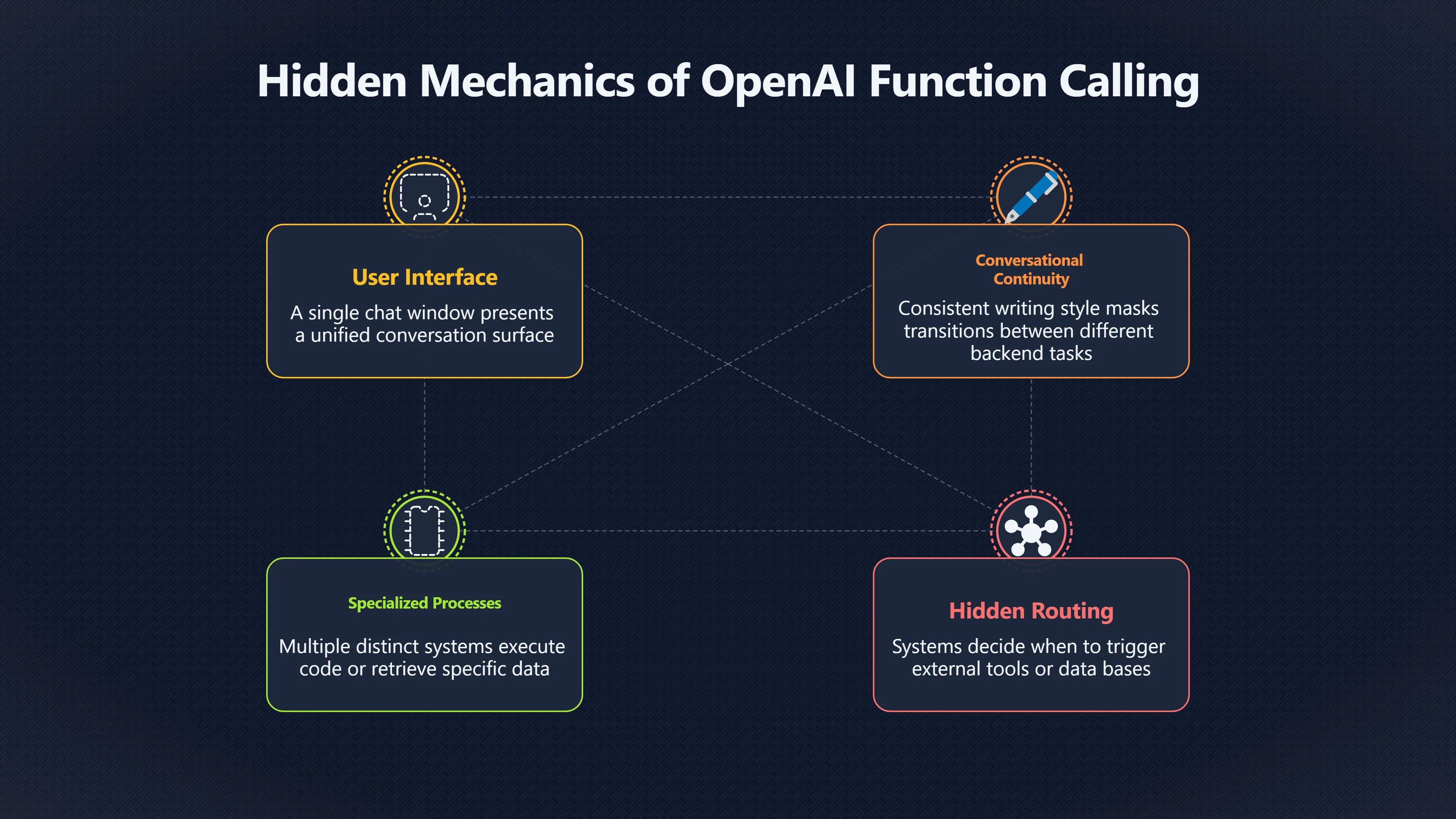
One reason a modern AI assistant can seem like a single general intelligence is that it preserves conversational continuity while quietly changing what it is doing underneath. A user may ask for a summary, then a web search, then a piece of code, then a schedule, all within the same chat window. The conversation feels continuous, so the underlying shifts between different functions are easy to miss. The result is a powerful impression that one mind is handling every task, even when multiple specialised processes, tools, or external systems are involved. Research on conversational agents and tool-using AI systems shows that many assistants now combine language generation with retrieval systems, external tools, and task-specific services, yet present the outcome through a single conversational surface.[OpenAI Developers]developers.openai.comfunction callingOpenAI DevelopersFunction calling | OpenAI API7 Aug 2025 — Tool calling is a multi-step conversation between your application and a model…
How language turns many tools into one surface
Traditional software usually makes task changes visible. Opening a calculator, switching to a browser, and then launching a coding environment creates obvious boundaries between activities. Chatbots remove many of those boundaries.
In a conversational interface, every request arrives in the same form: natural language. Whether the system is generating text, retrieving information, calling a tool, or triggering an external service, the user’s experience remains the same. They type a message and receive a reply. Conversational interface designers often describe language as a universal interaction layer because it can represent many different tasks without requiring different controls or screens.[Zendesk]zendesk.comWhat is a conversational interface?What is a conversational interface?April 16, 2026 — 23 Mar 2024 — Conversational user interfaces can be built with AI, natural lan…
This design creates an important psychological effect. The user sees continuity in the dialogue rather than transitions between functions. The visible interaction remains stable even when the underlying operation changes substantially.
Consider a typical exchange:
- “Summarise this article.”[researchgate.net]researchgate.netConversational AI and the Future of Intelligent ChatbotsThis comprehensive article examines the evolution and future trajectory of conver…
- “Find recent information about the topic.”
- “Write Python code to analyse the data.”
- “Turn the findings into a project plan.”
From the user’s perspective, these are four messages in one conversation. Under the surface, they may involve different capabilities, data sources, and execution pathways. Yet the conversation presents them as a single ongoing interaction.[OpenAI Developers]developers.openai.comfunction callingOpenAI DevelopersFunction calling | OpenAI API7 Aug 2025 — Tool calling is a multi-step conversation between your application and a model…
Why seamless turns make task changes hard to notice
The key mechanism is conversational continuity. Humans naturally interpret a coherent dialogue as evidence of a coherent agent.
When an assistant remembers previous messages, refers back to earlier context, and answers in a consistent voice, the interaction feels unified. The user’s attention stays focused on the topic being discussed rather than on the technical processes producing the response. Research in human–computer interaction has repeatedly found that conversational design strongly shapes perceptions of intelligence, trust, and coherence.[arXiv+2Utrecht University]arxiv.orgUX Research on Conversational Human-AI Interaction: A Literature Review of the ACM Digital LibraryFebruary 20, 2022…
Several interface features reinforce this effect:
- Shared conversation history makes separate actions appear connected.
- Consistent writing style makes different functions sound like one source.
- Immediate responses reduce awareness that different systems may have been activated.
- Context retention encourages users to view each answer as part of one ongoing thought process.
A useful comparison is a human office worker who silently switches between a calculator, email client, search engine, and calendar while talking to a colleague. The colleague experiences a single conversation, not a series of tool changes. Chatbots create a similar impression, except the tools may be software services operating behind the interface.

The hidden routing that users rarely see
Many modern assistants do more than predict text. They can decide when to retrieve information, query databases, search documents, execute code, or call external tools. Tool-calling frameworks are explicitly designed around this idea: the model determines when a task requires an external capability, the system executes that capability, and the final result is returned through the conversation.[OpenAI Developers+2TECHCOMMUNITY.MICROSOFT.COM]developers.openai.comfunction callingOpenAI DevelopersFunction calling | OpenAI API7 Aug 2025 — Tool calling is a multi-step conversation between your application and a model…
The important point is not that tool use exists. It is that the interface often conceals it.
A user may ask:
“What meetings do I have tomorrow, and draft a reply to the latest client email?”
The assistant might access a calendar system, retrieve email information, generate text, and format the response. Yet the user often receives a single conversational answer rather than a visible sequence of distinct operations. Studies of tool-augmented conversational systems increasingly treat these behaviours as coordinated workflows involving multiple components rather than a single monolithic capability.[arXiv+2OpenAI Developers]arxiv.orgarXiv Tool Talk: Evaluating Tool-Usage in a Conversational SettingarXiv Tool Talk: Evaluating Tool-Usage in a Conversational Setting
Because the switching is hidden, users can easily attribute the entire performance to one broad intelligence rather than to a collection of specialised mechanisms.
Where hidden switching can mislead users about capability
The main risk is not that the assistant is pretending to use tools. The risk is that users may misunderstand what the assistant itself understands.
When a chatbot successfully retrieves information from a database, users may conclude that it already possessed that knowledge. When it performs a calculation using a specialised process, users may assume the same capability exists in every context. When it completes a workflow involving several systems, users may infer a level of general reasoning that exceeds what any single component provides.[arXiv]arxiv.orgarXiv Tool Talk: Evaluating Tool-Usage in a Conversational SettingarXiv Tool Talk: Evaluating Tool-Usage in a Conversational Setting
This misunderstanding can produce several common errors:
- Overestimating competence. Success in one tool-supported task is interpreted as evidence of broad understanding.
- Confusing access with knowledge. Retrieved information may appear indistinguishable from information the model already knew.
- Assuming consistency across domains. Users may expect strong performance everywhere because the interface remains the same.
- Attributing coordination to a unified mind. Multiple specialised processes can be mistaken for a single general capability.
The smoother the transitions become, the stronger this illusion can be. If every operation is presented through identical dialogue, users receive fewer cues about where the system’s boundaries actually lie.
Why this matters for understanding AI
Understanding artificial intelligence requires separating the conversational experience from the underlying mechanisms. A chatbot may feel like one continuously thinking entity because the dialogue never breaks. However, continuity of conversation is not the same thing as continuity of capability.
The chat interface acts as a layer that unifies many activities into one user experience. Search, retrieval, planning, writing, calculation, coding assistance, and external tool use can all appear as successive turns in the same conversation. That design is extremely useful because it reduces friction and makes complex systems easier to use. At the same time, it can make task switching nearly invisible.
This is one of the reasons a single chat box can make narrow AI systems look more general than they are. The conversation remains constant while the underlying work changes, encouraging users to perceive one seamless intelligence where there may actually be a collection of specialised capabilities working together behind the scenes.[OpenAI Developers+2Mendix Documentation]developers.openai.comfunction callingOpenAI DevelopersFunction calling | OpenAI API7 Aug 2025 — Tool calling is a multi-step conversation between your application and a model…
Amazon book picks
Further Reading
Books and field guides related to Why one chat feels like one mind. Use these as the next step if you want deeper reading beyond the article.
Artificial Intelligence
Provides background on different AI methods hidden behind interfaces.
The Master Algorithm
Shows how varied capabilities can emerge from different techniques.
eBay marketplace picks
Marketplace Samples
Example marketplace items related to this page. Use the search link to explore similar finds on eBay.




Endnotes
1.
Source: developers.openai.com
Title: function calling
Link:https://developers.openai.com/api/docs/guides/function-calling
Source snippet
OpenAI DevelopersFunction calling | OpenAI API7 Aug 2025 — Tool calling is a multi-step conversation between your application and a model...
2.
Source: arxiv.org
Title: arXiv Tool Talk: Evaluating Tool-Usage in a Conversational Setting
Link:https://arxiv.org/abs/2311.10775
3.
Source: zendesk.com
Title: What is a conversational interface?
Link:https://www.zendesk.com/blog/customer-service/support/conversational-interface/
Source snippet
What is a conversational interface?April 16, 2026 — 23 Mar 2024 — Conversational user interfaces can be built with AI, natural lan...
Published: April 16, 2026
4.
Source: docs.mendix.com
Title: conversational ui
Link:https://docs.mendix.com/agents/genai-for-mx/conversational-ui/
Source snippet
Mendix DocumentationConversational UI4 Jun 2026 — Describes the Conversational UI marketplace module that assists developers in implement...
5.
Source: arxiv.org
Link:https://arxiv.org/abs/2202.09895
Source snippet
UX Research on Conversational Human-AI Interaction: A Literature Review of the ACM Digital LibraryFebruary 20, 2022...
Published: February 20, 2022
6.
Source: techcommunity.microsoft.com
Title: choosing the right tool a comparative analysis of the assistants api chat compl
Link:https://techcommunity.microsoft.com/blog/azure-ai-foundry-blog/choosing-the-right-tool-a-comparative-analysis-of-the-assistants-api–chat-compl/4140438
Source snippet
Azure OpenAI Assistants API vs Chat Completions API15 May 2024 — Function calling allows your LLM to interact with predefined functions (...
Published: May 2024
7.
Source: community.make.com
Title: openai assistants with function calling
Link:https://community.make.com/t/openai-assistants-with-function-calling/55083
Source snippet
assistants with function calling - Questions15 Sept 2024 — Here is the [documentation]({{ 'paper-safety/' | relative_url }}) that will give you directions how to get started wit...
8.
Source: arxiv.org
Link:https://arxiv.org/list/cs.HC/new
Source snippet
Human-Computer InteractionThe paper introduces Interaction-Centered Intelligence as a framework for understanding human-AI co-creation, c...
9.
Source: community.openai.com
Title: diff between assistants tools and function calling
Link:https://community.openai.com/t/diff-between-assistants-tools-and-function-calling/566648
Source snippet
API20 Dec 2023 — I am just wondering if I switch to only using the function calling will the AI still be able to call other functions to...
10.
Source: research-portal.uu.nl
Link:https://research-portal.uu.nl/ws/files/236821994/10.1201_9781003490685-7_chapterpdf.pdf
Source snippet
uu.nl7 Conversational Agentsby AP Chaves · 2024 · Cited by 1 — The human-computer interaction (HCI) field plays a crucial role in the con...
Additional References
11.
Source: ai-sdk.dev
Link:https://ai-sdk.dev/docs/ai-sdk-ui/chatbot-tool-usage
Source snippet
Chatbot Tool UsageWith useChat and streamText, you can use tools in your chatbot application. The AI SDK supports three types of tools in...
12.
Source: researchgate.net
Link:https://www.researchgate.net/publication/391753997_Conversational_AI_and_the_Future_of_Intelligent_Chatbots_Bridging_Human-Machine_Interaction_with_CCAI
Source snippet
Conversational AI and the Future of Intelligent ChatbotsThis comprehensive article examines the evolution and future trajectory of conver...
13.
Source: medium.com
Link:https://medium.com/the-modern-scientist/everything-you-need-to-know-about-openai-function-calling-and-assistants-api-55c02570a21c
Source snippet
Everything you need to know about OpenAI function calling...This article delves into the intricate world of OpenAI's Chat Completions an...
14.
Source: reddit.com
Link:https://www.reddit.com/r/UXDesign/comments/1tne1zm/is_chat_actually_the_right_interface_for_ainative/
Source snippet
Is chat actually the right interface for AI-native software?I keep thinking that today’s ChatGPT-style interface feels a bit like a comma...
15.
Source: techradar.com
Link:https://www.techradar.com/pro/why-the-chat-ai-surge-is-breaking-enterprise-tech-as-we-know-it
Source snippet
These outdated systems lack essential capabilities like modern APIs, searchable metadata, and explainable access, making integration with...
16.
Source: youtube.com
Link:https://www.youtube.com/watch?v=pI1yUiNKyDA
Source snippet
OpenAI Function Calling Explained: Chat Completions...Dive into the world of AI chatbots with our detailed tutorial on OpenAI's Function...
17.
Source: youtube.com
Link:https://www.youtube.com/watch?v=p0I-hwZSWMs
Source snippet
Function Calling with OpenAI APIs | A Crash CourseIn this video I'm going to do a quick introduction to function calling with the openi apis...
18.
Source: aakashgupta.medium.com
Title: the chatbot era is already over heres what s replacing it 85e176769e04
Link:https://aakashgupta.medium.com/the-chatbot-era-is-already-over-heres-what-s-replacing-it-85e176769e04
Source snippet
Chatbot Era Is Already Over. Here's What's Replacing It.Once AI embeds into your workflow, switching becomes painful. With chatbots, swit...
19.
Source: linkedin.com
Title: I was curious who’s building AI interfaces that aren’t chat.1
Link:https://www.linkedin.com/posts/hnshah_i-was-curious-whos-building-ai-interfaces-activity-7332910552324743168-Y0Hl
Source snippet
Auto-Built UIs - AI creates the interface you need on the fly. Instead of fixed screens, it builds buttons, inputs, and views based on yo...
20.
Source: gettingstarted.ai
Title: openai ai assistants api function calling tool tutorial
Link:https://www.gettingstarted.ai/openai-ai-assistants-api-function-calling-tool-tutorial/
Source snippet
Getting Started with AIOpenAI Function Calling Example using the Assistants API6 Dec 2023 — In this tutorial, we will see how we can leve...
Topic Tree